
One Step
ONE STEP SOFTWAREHouse & Home
4.4505.00 Reviews
- Version
- 2.7.2
- Installs
- 50.00K
- Age Rating
- Everyone
Screenshots
Our Review of One Step
 Analysis by Appyee
When recovery support has to fit around work in a shared living environment, the hardest part is often not knowing what support exists; it is keeping check-ins, meetings, and location details in one practical routine. One Step is a free House & Home app from ONE STEP SOFTWARE built around that kind of coordination. I found its focus refreshingly narrow: it is not trying to be a general wellness journal, a social network, or a replacement for professional care. Its purpose is to help house staff stay connected with people who need recovery support.
That focus makes it worth considering for sober-living homes, recovery residences, and similar settings where staff need a simple way to organize contact and movement. It also creates an important boundary. I would not treat this app as a treatment program, an emergency service, or a substitute for a clear house policy. Its value depends on whether check-ins, meetings, and location sharing are already part of the way your residence operates.
What I would look at before choosing One Step
My first decision criterion is role. One Step makes the most sense when the main user is house staff who need recovery-related oversight, rather than an individual looking for a private habit tracker. Before installing it, I would ask who is expected to use it, what information staff actually need during a normal shift, and whether residents understand how location sharing and check-ins fit into the house rules.
The second criterion is workflow. An app can sound useful but still add friction if staff must duplicate every update in paper notes, messaging apps, calendars, and spreadsheets. I would test one ordinary day: a resident checks in, attends a meeting, shares a location, and later needs staff attention. If One Step keeps those moments together, it has a practical advantage. If it merely creates another inbox, the benefit becomes much smaller.
The third criterion is trust. Recovery support is personal, and location information can feel especially sensitive. I would introduce the app with a plain explanation of what staff expect, when updates are needed, and how the information is used inside the residence. That conversation is not an optional extra. Without it, even a well-intentioned tool can feel like surveillance and reduce cooperation.
The fourth criterion is device compatibility and maintenance. The current version is 2.7.2 and requires at least Android 9, so I would check the phones used by staff and residents before planning a rollout. The app is free, which removes a direct purchase barrier, but free does not mean costless: someone still has to explain the process, monitor participation, and decide what happens when a phone is offline, forgotten, or replaced.
One Step has been available since March 20, 2018, and its audience appears established rather than experimental. It has passed 50K installs, with an average rating of 4.4 from roughly 1.2K ratings and 505 written reviews. I see those figures as a useful sign of real adoption, not as proof that it will suit every residence. The strongest evidence for a good fit will still come from a short, supervised trial with the people who will use it every day.
How the core workflow feels in daily use
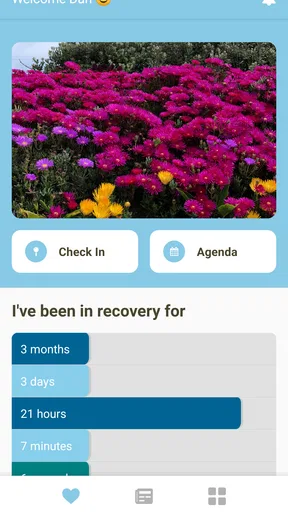
The app’s central idea is easy to understand: recovery support is easier to coordinate when check-ins, meetings, and location sharing are visible in the same work context. I like that this connects routine accountability with practical house management. Staff do not have to think only in terms of missed appointments; they can also see whether a resident has completed the small communication steps that keep a day organized.
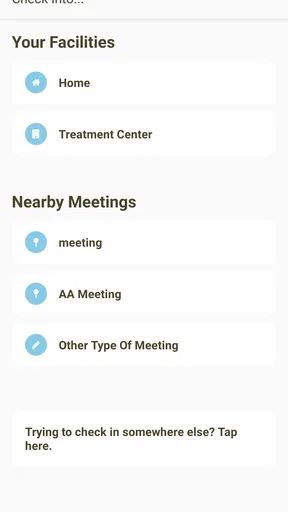
A realistic example would be a resident leaving the house for a scheduled meeting. Instead of relying on a casual text that may be buried later, the resident can use the expected check-in process, share the relevant location information, and give staff a clearer picture of the plan. When the resident returns, the next update can close that loop. The advantage is not dramatic automation. It is a more consistent handoff between the resident’s plan and the staff member responsible for the house.
That consistency matters most during busy periods. A staff member may be handling arrivals, medication-related questions, chores, visitors, and several residents at once. A dedicated recovery-support workflow can be easier to scan than a mixture of personal messages and verbal reminders. My practical tip would be to define a small number of standard moments for using the app rather than asking residents to update it constantly. Predictable checkpoints are easier to follow and less likely to feel intrusive.
I would also use the app as a prompt for better conversations, not as a scorecard. If a meeting check-in is missed, the useful next step is to ask what happened and whether the plan needs adjusting. Treating every missing update as a failure could turn a support tool into a punishment system. One Step can organize information, but the quality of recovery support still comes from the people interpreting it with judgment.
Where One Step is stronger than familiar alternatives
The clearest strength is specialization. A general calendar can record a meeting, and a messaging app can carry a location pin, but each tool handles only one piece of the situation. One Step brings the support context closer to the staff workflow. That reduces the mental effort of remembering which conversation contains which update.
A paper sign-out sheet has a different strength: it is visible, familiar, and independent of a phone. However, paper is harder to coordinate when staff work different shifts, and it does not naturally connect a check-in with meeting attendance or location sharing. One Step is more useful when several people need a shared view of ongoing activity rather than a single binder at the front desk.
Messaging apps are flexible and often already installed, but flexibility can become disorder. A resident may send a message to one staff member while another person remains unaware of the change. Messages also mix urgent matters with routine updates. A purpose-built recovery-support app offers a clearer boundary between house communication and personal conversation, provided the residence actually agrees to use it consistently.
General task managers and shared calendars are better choices when the main need is scheduling chores, appointments, or staff shifts. I would not force One Step to manage every household task simply because it is already present. Its advantage is the recovery-support layer. Pairing it with an existing calendar may be more sensible than expecting one app to become the entire operating system of a residence.
A private journal or habit tracker may suit an individual who wants reflection without staff involvement. That is precisely where I would not recommend One Step as the default. Its usefulness comes from coordinated support, so someone seeking a personal, confidential record may be more comfortable with a tool designed for private notes and self-monitoring.
Small practices that make the app more useful
My first practical recommendation is to separate routine from escalation. A normal check-in should not carry the same emotional weight as a serious concern, and staff should explain which situations require a direct call or immediate human attention. The app can support regular communication, but a residence should never assume that a digital update is enough for an urgent situation.
My second recommendation is to agree on location-sharing expectations before enabling that part of the workflow. A useful house rule might explain when a location is relevant to a planned outing, who can see it, and what residents should do if their plans change. Even without adding complicated procedures, this clarity prevents arguments later. The technology works better when the social contract is clear.
My third recommendation is to review patterns rather than isolated events. One late check-in may reflect a dead battery, a meeting running long, or a simple mistake. Repeated gaps may suggest that the schedule is unrealistic, the instructions are confusing, or the resident needs a different kind of support. Looking for patterns keeps staff from overreacting to one imperfect update.
A fourth useful practice is to create a handoff habit between shifts. The outgoing staff member can identify which check-ins or meetings still need attention, while the incoming person knows where to look first. This is where a focused app can outperform scattered texts: the next staff member has a defined place to begin. The benefit depends on staff actually adopting that handoff instead of reverting to private messages.
I would also introduce One Step gradually. Start with the smallest workflow that solves a real problem, observe where residents hesitate, and adjust the instructions before adding more expectations. A complicated launch can make people judge the app by the training burden rather than by its usefulness. In recovery settings, steady participation is more valuable than an impressive but unsustainable rollout.
Where another category may fit better
One Step is not automatically the best answer for every recovery residence. If your organization already has a secure case-management platform with check-ins, appointments, and communication in one place, adding another app may split attention. The specialized focus of One Step is appealing, but duplication can create conflicting records and make staff wonder which system is authoritative.
It may also be a poor fit for a home where residents have limited access to compatible devices or unreliable connectivity. The minimum operating-system requirement is Android 9, and the practical experience will depend on the phones people bring and how consistently they can use them. In that situation, a paper backup or staff-led process is not a sign of failure; it is a necessary safety net.
Homes that need extensive clinical documentation should look beyond a lightweight support workflow. One Step can help organize everyday accountability, but clinical notes, formal treatment records, and complex care coordination belong in systems designed for those responsibilities. I would avoid asking this app to carry information it was never meant to manage.
There is another human limitation: not everyone will welcome location sharing. Some residents may see it as supportive, while others may experience it as controlling, especially if the policy is vague or applied inconsistently. If your residence cannot explain the purpose and boundaries of that feature honestly, a simpler check-in method may produce more trust and better participation.
For a small home with one staff member and a handful of residents, a shared calendar plus a clearly organized communication channel might be enough. In that setting, the switching cost of adopting a dedicated app may outweigh the organizational gain. One Step becomes more compelling as the need for consistent handoffs and structured recovery-related updates grows.
The real cost of switching
Because the app is free, the financial decision is straightforward. The larger cost is behavioral. Staff must learn the workflow, residents must understand what counts as a completed update, and everyone must agree on what happens when an entry is missed. I would budget time for explanation and adjustment rather than treating installation as the whole project.
There is also a transition problem. If a residence moves from paper or messaging to One Step overnight, older information may remain scattered across notebooks and conversations. I would choose a clear starting point, preserve only the records that staff genuinely need, and tell everyone which method applies from that day onward. A clean boundary is easier to follow than a long period in which every channel remains “temporarily” active.
Training should use real scenarios instead of abstract instructions. Walk through leaving for a meeting, changing plans, returning late, and needing staff help. Those examples expose confusion quickly. They also show residents that the app is connected to ordinary life rather than being another rule delivered from above.
I would establish a backup process before relying on the app. A phone can be unavailable, a resident can forget credentials, or a staff member can miss an alert. The backup does not need to duplicate every detail, but it should cover urgent communication and the basic record needed for a safe handoff. This is an important trade-off: digital consistency is useful only when the residence remains prepared for interruptions.
Finally, review whether the app is actually reducing work after the trial period. Are staff checking one place instead of several? Are residents clearer about expectations? Are conversations improving, or are people simply entering more information? If the answers are negative, switching back or choosing a different category of tool may be wiser than defending the original decision.
Who should use it, and who should skip it?
I would recommend One Step to recovery residences and house staff who need a focused way to coordinate check-ins, meetings, and location sharing. It is especially suitable when multiple staff members share responsibility and need a common routine. The free price and Everyone content rating also make it easy to consider as a low-risk trial from an access standpoint, though the residence still needs thoughtful rules around personal information.
I would also consider it for a house that has outgrown informal texting but does not need a full clinical platform. That middle ground is where the app seems most useful: more structured than casual messages, but more focused than a large administrative system. The developer, ONE STEP SOFTWARE, has kept the product identity centered on the house-support setting rather than turning it into a broad lifestyle app.
I would skip it if you want a private self-help journal, a therapy service, emergency response, or a complete household management suite. I would also hesitate if staff cannot commit to using the same process across shifts. Inconsistent adoption is likely to erase the main advantage and leave residents managing two systems at once.
For an individual outside a recovery residence, the decision is less obvious. The app’s purpose is tied to staff-supported accountability, so a personal calendar, reminder tool, or private recovery journal may be a better match depending on the goal. I would not install it simply because it is free; I would install it when its shared-support model reflects the way help is actually organized.
My recommendation after weighing the trade-offs
One Step is best understood as a coordination tool for recovery homes, not as recovery itself. I like its focused combination of check-ins, meetings, and location sharing because those activities often become fragmented when handled through ordinary apps. It can give staff a more consistent starting point and give residents a clearer routine, especially when several people share responsibility for the house.
My recommendation is to try it with a defined workflow, a written explanation of expectations, and a backup for urgent situations. Begin with a small group, use realistic daily scenarios, and judge success by whether communication becomes clearer rather than by how much information gets entered. That approach respects both the app’s strengths and the sensitive nature of recovery support.
The rating of 4.4 and the community of more than 50K installs make One Step credible enough to investigate, while the current version 2.7.2 keeps the decision tied to present-day compatibility rather than its long history alone. Still, I would let fit decide. If you need shared recovery-related check-ins in a house setting, this free app is a sensible candidate. If you need clinical records, private reflection, or broad home administration, another category will serve you better.
After using it as a decision guide rather than a magic solution, my view is positive but measured. One Step earns its place when it replaces scattered routines with one understandable process and when staff use the information to support people, not merely monitor them. Used that way, it can make everyday coordination less chaotic without pretending to solve the deeper work of recovery.
Verdict
Strengths of One Step
- Simple one-touch gameplay that is easy to understand immediately.
- Short sessions make it suitable for quick breaks or casual play.
- Minimal controls work well on both phones and tablets.
- Clean visual style keeps the screen easy to follow.
- Gradual challenges can help improve timing and concentration.
Limitations of One Step
- Gameplay may feel repetitive after extended sessions.
- Limited content can reduce long-term replay value.
- Precision-based controls may be frustrating on smaller screens.
- Progress can feel slow for players seeking constant variety.
- Some features may depend on ads or in-app purchases.
Similar Picks in This Category
View All
Universal TV Remote Control
CodeMatics Media Solutions3.9

AlfredCamera Home Security app
Alfred Systems Inc.4.7

Planner 5D: AI Home Design
Planner 5D4.5

Universal Tv Remote-Cast to TV
One Music Player4.1

Zillow: Homes for Sale & Rent
Zillow Group4.8

99acres Buy/Rent/Sell Property
infoedge.com4.3
Frequently Asked Questions
What is One Step, and how does the app work?
One Step is designed to help users manage progress through simple, focused actions rather than complicated menus or lengthy setup processes. After opening the app, you can explore its main tools, follow the available instructions, and complete tasks one at a time. The exact experience may vary depending on the version and platform, so reviewing the app description before downloading is recommended.
Is One Step free to download and use?
One Step may be available as a free download, but some features, content, or customization options could require in-app purchases or a subscription. Before installing it, check the current listing in the Google Play Store or Apple App Store for pricing details, trial conditions, and recurring billing information. Availability and costs can also differ between Android and iOS.
Does One Step require an internet connection?
The need for an internet connection depends on which part of One Step you are using. Basic functions may work offline after installation, while account synchronization, updates, online content, advertisements, or cloud-based features may require mobile data or Wi-Fi. If offline access is important to you, test the main tools after installation and review the developer’s latest requirements.
Is One Step suitable for beginners and all age groups?
One Step is generally intended to be straightforward, making it approachable for users who prefer a guided and uncomplicated experience. However, suitability depends on the app’s specific purpose, content, and age rating. Parents should review permissions, advertising, purchases, and privacy information before allowing children to use it, while new users can begin by exploring its basic features.
What permissions and privacy considerations should I check before downloading One Step?
Before installing One Step, review the permissions requested by the app and compare them with the features it provides. Depending on its design, it may request access to notifications, storage, network connectivity, or other device functions. Read the developer’s privacy policy to understand how information is collected, used, shared, and deleted, and avoid granting permissions that are not necessary.
